Pages

How to set up ( Fedora php ruby on rails )

Monday, January 2, 2012

Android: How to include classes from other project from command line

How to add reference to an other android project(ANT)

Often we need to refer classes from other projects using eclipse is kinda easy and google will help you a lot in doing that, but here I am going to show how to include classed or refer other android project libs in your project

Suppose you have project one with a class Student with attribute name along with setter and getter and want to import Student class in second project, First you need to update project second to tell where to load files that can be done by
android update project --path ./ --library ./../SecondProject
if you debug your code now you probably will get exception because (probably) project one is not a library project. so you need to go to first project and update project.properties file and add android.library=true after target=your target
now compile the project all will go well.

Now you want to use the Student class from package one (com.package.one) is package name then you can use import com.package.one.Student; 

Sunday, June 12, 2011

Cpanel gems installation errors

You need ssh access to server to perform all these tasks


Did you get an errors like this when installing gems on cpanel


Missing these required gems:
will_paginate

You're running:
ruby 1.8.7.173 at /usr/bin/ruby
rubygems 1.3.5 at /home/bronze/ruby/gems, /usr/lib/ruby/gems/1.8/

Run `rake gems:install` to install the missing gems.


You need to add path in your .bashrc file


if [ -f /etc/bashrc ]; then
. /etc/bashrc
fi

export PATH=$PATH:$HOME/ruby/gems/bin
export GEM_PATH=$HOME/ruby/gems:/usr/lib/ruby/gems/1.8/
export GEM_HOME=$HOME/ruby/gems

And this to your config/environment.rb file


ENV['GEM_PATH'] = '/home/username/ruby/gems:/usr/lib/ruby/gems/1.8/'

Note:

Must replace username with your server username

What next


Source your .bashrc file or create new ssh session by logging out and logging in back


In most cases you won't have your .bashrc and .bash_profile file and you need this to make it work


Code for .bash_profile


if [ -f ~/.bashrc ]; then
. ~/.bashrc
fi

Wednesday, June 8, 2011

Encoding::UndefinedConversionError Ruby/Rails

Problem is you opening a binary file and writing it somewhere on other file using ruby/rails


Solution


open file as binary and write it back


File.open(target_file, 'w+b', 0644) do |file|
file.write(destination_file.data)
end

Sunday, February 20, 2011

How to remove Model Name from errors message in rails

Remove model/Table name from form errors


Here i am going to use regular expression to remove model/table name from my errors messages


<% @company.errors.full_messages.each do |msg| %>
<%= msg.gsub(/^\w+/, "").strip.capitalize %>
<% end %>

Tuesday, February 15, 2011

Development to Production db:migration

1. How to create tables in production environment from development


2. How to copy tables from development to production


this will only migrate tables structure from development to production


RAILS_ENV=production rake db:migrate

Monday, February 14, 2011

Rake Route(How to see routes of specific controller)

How to target specific controller in rake routes command


Most of time i need to look at my routes and as project increases so the list of routes and it's get confusing to find a specific routes using rake routes command so here is the answer


rake routes CONTROLLER=controller_name

For Example


rake routes CONTROLLER=posts

Thursday, December 30, 2010

CodeRay with Ruby On Rails 3

Code highlight in Ruby On Rails 3 Using CodeRay


First open your Gemfile and add


gem 'coderay'

and run bundle install


bundle install

Next you need to add a method any where you want best place would be ApplicationController


def coderay(text)
text.gsub(/<code( lang="(.+?)")?>(.+?)<\/code>/m) do
CodeRay.scan($3, $2).div(:css => :class)
end
end


Suppose you have controller Post and it's action show
app/controllers/posts_controller.rb


def show
@post = Post.find(params[:id])
@post.body = coderay(@post.body)
end


now in view file change following
app/views/posts/show.html.erb


<%= @post.body %>


To


<%= sanitize @post.body %>


Now you need a stylesheet that define color scheme for your code


span.af{/* attribute name fat */}
span.an{/* attribute name */}
span.av{/* attribute value */}
span.aw{/* attribute value fat */}
span.bi{/* bin */}
span.c{/* comment */}
span.ch{/* char */}
span.cl{/* class*/}
span.cr{/* colour */}
span.co{/* constant */}
span.cv{/* class variable */}
span.df{/* definition */}
span.di{/* directive */}
span.dl{/* delimeter */}
span.do{/* doc */}
span.ds{/* doc string */}
span.e{/* escape */}
span.er{/* error */}
span.ex{/* exception */}
span.fl{/* float */}
span.fu{/* function */}
span.gv{/* global variable */}
span.hx{/* hex */}
span.i{/* integer */}
span.ic{/* include */}
span.id{/* ident */}
span.il{/* inline */}
span.in{/* interpreted */}
span.iv{/* instance variable */}
span.k{/* content */}
span.ke{/* css attribute */}
span.kw{/* css selector */}
span.la{/* label */}
span.lv{/* local variable */}
span.mod{/* modifier */}
span.oc{/* oct */}
span.on{/* operator name */}
span.op{/* operator */}
span.pc{/* pre constant */}
span.pt{/* pre type */}
span.pd{/* predefined */}
span.pp{/* preprocessor */}
span.rx{/* reg exp */}
span.r{/* reserved */}
span.s{/* string */}
span.sh{/* shell */}
span.sp{/* space */}
span.sy{/* symbol */}
span.ta{/* tag */}
span.tf{/* tag fat */}
span.ts{/* tag special */}
span.ty{/* type */}
span.v{/* variable */}
span.vl{/* css value */}
span.xt{/* xml text */}


Wednesday, December 29, 2010

How to update rails site hosted on Heroku

So how to update changes made locally to remote server


Very simple to do that, make amendments in your project and than follow these steps


Note: Be sure you are in root of application directory


[rubyonrails@localhost rails_sandbox]$ git add .


[rubyonrails@localhost rails_sandbox]$ git commit -m "some message here"


[rubyonrails@localhost rails_sandbox]$ git push heroku master

Ruby on Rails Free Hosting

Hosting Ruby On Rails Free


Host rails 2 or rails 3 apps for free and easily


Once you set up a site, you can set up as many sites as you want


If you are a Rails developer and want to host for free for testing purpose check-out http://www.heroku.com


For this you need to sign-up for two sites first is Heroku and other is github..
After sign-up go to quick start page of heroku.com and follow instructions and in the end you would have a hosted rails application


Need Help:


Do comment

Saturday, October 2, 2010

Ruby On Rails 3 on Fedora 14

Fedora 14(Laughlin) and Rails 3


This post will just let you install only on version of rails on your Fedora 14 that is rails 3 but first we will install rails 2.3.8 from fedora repository. Keep in mind you will able to run only one version of Rails with this method and if you want to run multiple version or installtion than you need to follow on of my old post in which i have used RVM for manging different version of Ruby and also Rails.
Installing and setting up Rails 3 on Fedora 13 (Ruby on Rails 3 RC)


First Installing Ruby 1.8.7 with Rails 2.3.8


[ismail@localhost ~]$ sudo yum install rubygem-rails ruby-devel mysql-devel-y

Now you have running version rails 2.3.8 without mysql database support for rails


Adding mysql rails and ruby support


[ismail@localhost ~]$ sudo yum install ruby-mysql -y

Note: Now you can stop following if you don't want to install rails 3 on fedora 14


upgrading to Rails 3


[ismail@localhost ~]$ sudo gem install rails

If all went cool than you have running version of rails 3 on fedora 14 now create an application and run bundle install to test your installation


[ismail@localhost ~]$ rails new my_app -d mysql
[ismail@localhost ~]$ cd my_app
[ismail@localhost ~]$ bundle install

Have fun with Rails 3 on Fedora 14

Monday, September 6, 2010

ruby 1.9.2 installation on fedora 13 ( also on fedora 14)

Waiting for ruby 1.9.2 or 1.9.1 for fedora?


Your wait have both ended and not. ended in sense now you can install latest release on fedora 13 or fedora 14 using RVM. but bad news is for ruby 1.9.x native install won't come early. Sooner we will have ruby1.8.7 but no chance for ruby 1.9.x so start using ruby1.9.x on rvm if you are curious to that actually really a cool application that can handle multiple ruby version at the same time. if you want to install ruby 1.9.x than you can follow by old post which is about installing ruby on rails 3 on fedora 13.


Ruby on Rails 3 have been released.


Yes Rails 3 have been released and it requires ruby version 1.8.7 or 1.9.2 actually 1.9.1 have number of bugs so rails community recommends you to use 1.9.2 so nor yet ubuntu have ruby 1.9.2 (the day i am posting this post till than ) so you can install using rvm and for installation of rails 3 on fedora you can follow my old post about installing ruby on rails 3 release candidate as rails is released so now you can you use the released version of rails 3. and my previous post will work fine for that. Well if you are running ruby 1.8.7 or above you can install rails 3 by just with single command


sudo gem install rails

Troubling install MySQL with rails 3?


sudo yum install mysql-devel

Use about command in fedora and than install using gem or through bundle install command in your rails project everything will work cool and that will actually install mysql2 driver

Saturday, September 4, 2010

Creating read more links in ruby on rails 3

Read morelinks in rails 3


this episode describe you how to create read more links in your rails projects

Thursday, July 22, 2010

Installing and setting up Rails 3 on Fedora 13 (Ruby on Rails 3 RC)

How To installing Ruby On Rails 3 (Release Candidate) on Fedora 13


First make sure following packages are installed on you fedora 13 system.(Requires especially if you have installed fedora from live CD instead of DVD)


[ismail@localhost ~]$ sudo yum install git bison svn autoconf sqlite-devel

Do almost every task where possible as normal user instead of super user for this installation


To start installation of Rails 3 on fedora we are using RVM(ruby version manager) so we can use our old stable release as well latest beta on our fedora system


First of all we need to install RVM so lets begin


[ismail@localhost ~]$ bash < <( curl http://rvm.beginrescueend.com/releases/rvm-install-head )

Now add the following line to your .bashrc file:


[ismail@localhost ~]$ if [[ -s "$HOME/.rvm/scripts/rvm" ]] ; then source "$HOME/.rvm/scripts/rvm" ; fi

Now you need to close termial and start again and run following command:


[ismail@localhost ~]$ rvm notes

Above command will reveal the dependencies for installing ruby using RVM cuz it compile stuff and than you can install ruby without any pain with single command:


[ismail@localhost ~]$ sudo yum install -y gcc-c++ patch readline readline-devel zlib zlib-devel libyaml-devel libffi-devel

Now lets install ruby 1.9.2-head cuz rails 3 requires ruby 1.8.7 or greater and 1.9.2 have less bugs than others


[ismail@localhost ~]$ rvm install ruby-1.9.2-head

Now lets make ruby 1.9.2 as default so we can install rails 3 pre and don't worry you can easily come back to previous version with single command without and pain or problem


[ismail@localhost ~]$ rvm ruby-1.9.2-head --default

Now its time to install Rails 3 its simple to do just issue one command and you are done with installation


[ismail@localhost ~]$ gem install rails --pre

Your installation completed but no database support yet so you need to install sqlite3-ruby so you can work with rails 3 beta


[ismail@localhost ~]$ sudo gem install sqlite3-ruby

Now create your applications in Rails 3. Lets start.....


[ismail@localhost ~]$ rails new myApplication

Now go to newly created application folder


[ismail@localhost ~]$ cd myApplication

Now we need to run last command(Hope so) so our system fully working with rails


[ismail@localhost ~]$ bundle install

Now Start your rails server


[ismail@localhost ~]$ rails s

Open your browser and open localhost:3000
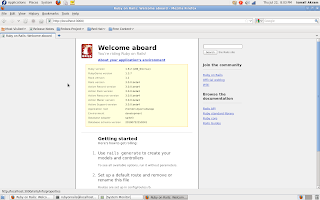


Note:

You may face error like activesupport requires ruby >= 1.8.7 try closing all terminal and than trying gem install rails --pre again and don't use sudo with this command as it will install in user directory so no need and you can make sure that gem using ruby 1.9.2-head by command gem env


I've been trying for long to install Rails 3 on fedora and atlast i've succeed and if you have errors regarding installing do comment and ya i am missing one thing that is using MySQL instead SQLite and and and ya thats it have fun with rails 3

Sunday, February 21, 2010

Installing Ruby On Rails Fedora 12 and 13

Setting Up Ruby On Rails on Fedora 12 and 13 one step only


Just one command and every thing is done

[ismail@localhost ~]$ sudo yum install rubygem-rails ruby-mysql rubygem-sqlite3-ruby rubygem-mongrel* rubygem-json rubygem-git ruby-devel


[ismail@localhost ~]$ sudo gem update

Why same post again


Following Error i confront so to resolve the problem here is new way


-bash-4.0$ rails my_app -d mysql
/usr/lib/ruby/site_ruby/1.8/rubygems.rb:827:in `report_activate_error': RubyGem version error: rack(1.1.0 not ~> 1.0.0) (Gem::LoadError)
from /usr/lib/ruby/site_ruby/1.8/rubygems.rb:261:in `activate'
from /usr/lib/ruby/site_ruby/1.8/rubygems.rb:296:in `activate'
from /usr/lib/ruby/site_ruby/1.8/rubygems.rb:295:in `each'
from /usr/lib/ruby/site_ruby/1.8/rubygems.rb:295:in `activate'
from /usr/lib/ruby/site_ruby/1.8/rubygems.rb:296:in `activate'
from /usr/lib/ruby/site_ruby/1.8/rubygems.rb:295:in `each'
from /usr/lib/ruby/site_ruby/1.8/rubygems.rb:295:in `activate'
from /usr/lib/ruby/site_ruby/1.8/rubygems.rb:68:in `gem'
from /usr/bin/rails:18

Updating gem does the work


[ismail@localhost ~]$ sudo gem update

So we are done here and enjoy programming with rails on Fedora 12


Ruby On Rails Rocks

Friday, October 2, 2009

Installing Ruby On Rails on Fedora 11 12

How to install Ruby On Rails on Fedora 11 12 . . . .


Installation of ruby on rails on fedora was never easy before and this type installing ruby on rails on fedora is one step task . In Past installing ruby on rails was just a mess have to issue lots of commands now just one command and every thing is setup and rails is ready to go on than.
and best thing about this type of installation is about mysql binding which also get install without any error


Installing ruby on rails along with mysql


[ismail@localhost ~]$ sudo yum install rubygem-rails ruby-mysql

Thats it ruby on rails is ready to go


Optional installtions


Installing sqlite3 for ruby on rails


[ismail@localhost test]$ sudo yum install rubygem-sqlite3-ruby

Installing mongrel server for rails


[ismail@localhost test]$ sudo yum install rubygem-mongrel*

Installing json for rails


[ismail@localhost ~]$ sudo yum install rubygem-json

Installing git for rails


[ismail@localhost test]$ sudo yum install rubygem-git

IF some thing is missing you want to install about rails do comment

Wednesday, August 12, 2009

how to setup and install drupal on fedora

Drupal 6.13


Today we are going to install drupal on feodra and it would be same way for other linux distributions


First of you need to get drupal installation that we can get using the following command


[ismail@localhost ~]$ wget http://ftp.drupal.org/files/projects/drupal-6.13.tar.gz

Now we need to be super user (Root user) to perform rest of task


[ismail@localhost ~]$ su
Password:
[root@localhost ismail]#

Now we need to move downloaded files to our web directory in fedora that directory is /var/www/html/ to move file to web directory use the following command


[root@localhost ismail]# mv drupal-6.13.tar.gz /var/www/html

Now files are moved now we get to go to web directory


[root@localhost ismail]# cd /var/www/html/

Now extract the files from tar file and rename the folder drupal-6.13 to site or any you want


[root@localhost html]# tar -xf drupal-6.13.tar.gz

[root@localhost html]# mv drupal-6.13 sites

Now we need to move to our project directory which in this case is sites and now the is a folder in that called sites which contain configuration files


[root@localhost html]# cd sites/sites

Now we to set some permission on files and folder so our setting can be written on files to do that use following commands


[root@localhost sites]# chmod a+w default/

[root@localhost sites]# cd default/

Now create setting file to do so use following command and default.settings.php is already will be present and required so we will need to copy just


[root@localhost default]# cp default.settings.php settings.php

[root@localhost default]# chmod a+w settings.php

Drupal need some database before you start installation so we create first database and i am using drupal_db as database name


[root@localhost default]# mysqladmin -u root -p create drupal_db
Enter password:

Now open firefox and put URL of your project folder which is sites in this case


[root@localhost default]# firefox localhost/sites &


Select Install Drupal in English


Now enter the database name in our case its drupal_db database user name its root in my case and your password for database

and click continue to start installing drupal


Now we need to remove write permissions from folders and files


[root@localhost default]# chmod a-w settings.php

[root@localhost default]# chmod a-w ../default/


Enter site name you wish , site e-mail , user name which will be used to edit your site and email for it and password for it and keep in mind while typing password , password must contain capital and small both letters and if possible also symbols also.


Now click on Your new site to see admin area and all


For further assistance do comments thanks

Monday, August 10, 2009

how to setup and install joomla on fedora

How to setup Joomla on fedora


First of all we need to make sure that php and mysql is install on our system included our webserver


[ismail@localhost ~]$ which php mysql httpd
/usr/local/bin/php
/usr/bin/mysql
/usr/sbin/httpd


If php or mysql or apache server is not installed you can install with following commands


[ismail@localhost ~]$ sudo yum -y install httpd php mysql mysql-server php-mysql

Alright now php mysql and apache(httpd) server is installed now we need to download Joomla from its site


[ismail@localhost ~]$ wget http://joomlacode.org/gf/download/frsrelease/10785/42655/Joomla_1.5.14-Stable-Full_Package.zip

Now Next steps are to be performed by root user


[ismail@localhost ~]$ su
Password:
[root@localhost ismail]#


Now Create a directory of your project in my case i have choosed mysite it can be any thing


[root@localhost ismail]# mkdir /var/www/html/mysite

Now we are going to move downloaded file of joomla in our site diectroy where we will extract files from zip


[root@localhost ismail]# mv Joomla_1.5.14-Stable-Full_Package.zip /var/www/html/mysite/

[root@localhost ismail]# cd /var/www/html/mysite

[root@localhost mysite]# unzip Joomla_1.5.14-Stable-Full_Package.zip

[root@localhost mysite]# rm Joomla_1.5.14-Stable-Full_Package.zip

Now we need to create a configuration file and make it read and write able


[root@localhost mysite]# vi configuration.php

[root@localhost mysite]# chmod 666 configuration.php

[root@localhost mysite]# firefox localhost/mysite &

Now configuring joomla


open your browser and type following on url


localhost/mysite


Click next after selecting your language default is english


Click next again its telling you your stats about your configuration


Click next to accept the agreement statement


Now first select database (Mysql) than tell your host name most probably your will be also localhost Next select username of mysql server i choosed root and than entered the password of your database server of root and last box is of database name i have choosed mysite_db as my database for my project of joomla. Now click next


Now select yes if you want ftp support on i choosed it as off and click next


Now enter your site configuratins such as site Name your Email address and your password for administrator Admin password now don't bother next steps i recommend to click next afer filling site name , email , password and confirm password and now click next pop up will come click ok to continue


Alright now you have done with configuration now you jsut need to delete a folder from installation folder folder name installation in mysite folder delete that


Folder you have to delete will be in following location /var/www/html/mysite/installation

[ismail@localhost ~]$ sudo rm -r /var/www/html/mysite/installation/

After you have deleted installation folder just type this url on your browser


localhost/mysite


Now you see is your home page and now to get start working type following url on browser


localhost/mysite/administrator


Enter user name as admin and password what you choosed during installation


Here you are done with installation and configuration of Joomla and now you can create manage your joomla site


For any help do comment

Sunday, August 9, 2009

How to install Skype on Fedora (setting up skype on fedora)

How to install and update Skype on Fedora


1. First you need to import GPG key


Open terminal and past one line by line


[ismail@localhost ~]$ gpg --keyserver pgp.mit.edu --recv-keys 0xD66B746E

[ismail@localhost ~]$ gpg -a -o /etc/pki/rpm-gpg/RPM-GPG-KEY-skype --export 0xD66B746E

2. Now have to setup skype repository


to do this you need to create a file in the following path


[ismail@localhost ~]$ su -c 'vi /etc/yum.repos.d/skype.repo'

and now once press key i and paste the following code in opened file


[skype]
name=Skype Repository
baseurl=http://download.skype.com/linux/repos/fedora/updates/i586/
gpgkey=file:///etc/pki/rpm-gpg/RPM-GPG-KEY-skype


3. Install skype using yum


yum install skype

Saturday, August 8, 2009

How to set up ( Fedora php ruby on rails )

How to setup up fedora php ruby on rails


This blog is about post installation of fedora. This blog will help you about setting up audio and video on feodra operating system. Fedora is not shipped with audio video code that we use in our daily life. like avi , mpeg , wmv , wma and many others but now you can play every thing on feodra.

How to play audio video on fedora
Other thing that is here about development tools help like installing ruby on rails on fedora 10 and 11 . and other thing is after installation giving you choice of different servers. To setup fedora with apache will never be easy before now just few commands you can run rails application on apache server.

How to install ruby on rails on fedora

how to setup user directory or how to setup web server user home directory know as public_html.

How to setup apache server user home directory
Playing windows files on fedora now quite easy

How to play Windows media on fedora
one Thing else fedora have no SUDO configure by default and so its a great setting that you must have .
How to configure SUDO user on fedora

Friday, August 7, 2009

setting a SUDO user in fedora ( configure SUDO)

First you need to become super user to add user to SUDO.


[ismail@localhost ~]$ su
Password:
[root@localhost ismail]#


Now issue the command visudo


[root@localhost ismail]# visudo


Look the image and add the following line in that file you have opened


ismail ALL=(ALL) ALL

And if you want that when you do sudo it don't asks for passwrod than uncomment and this part


## Same thing without a password
%wheel ALL=(ALL) NOPASSWD: ALL

Now we have to add user (ismail) to wheel grounp issue this command


[root@localhost ismail]# gpasswd -a ismail wheel

Now you have done to check are you root user or not login as normal user and issue this command


[ismail@localhost ~]$ whoami
ismail
[ismail@localhost ~]$ sudo whoami
root